
Windows / Rust / eframe / egui
Make Windows feel like a console.Jump into your library with a controller.
Big Screen Launcher is a controller-first launcher for TVs, couches, and big-screen PCs. It pulls together locally installed Steam, Epic, and Xbox titles into one flow, combining achievement browsing, launching, system return, vibration feedback, and power controls into a cohesive console-like experience.
3
Local libraries from three major platforms are detected automatically and merged into one entry point.
2
Parallel controller support: Xbox XInput and DualSense over USB.
0
From boot to return, the whole flow works without touching a keyboard or mouse.
Steam / Epic / Xbox
System-level return
Return from a game with the Xbox Home or PS button and land back in the launcher without breaking the controller-first flow.
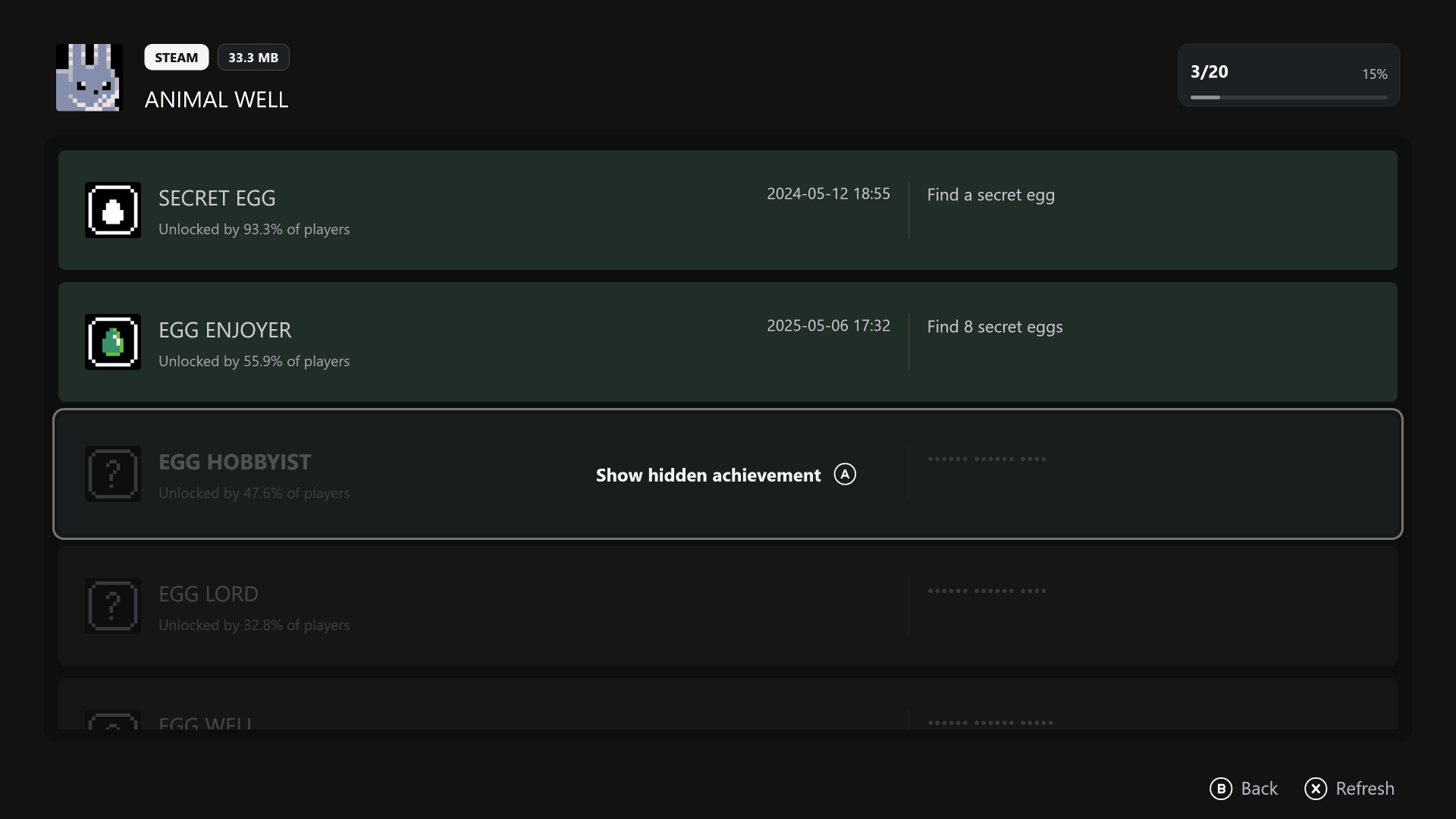
Browse Steam achievements inside the launcher with names, unlock rates, timestamps, and completion progress shown in one place.
Core Experience
Every important action is rearranged around controller navigation and TV readability.
This is not a desktop launcher stretched full screen. Discovery, achievements, launching, returning, and power management are shaped into one continuous console-style path.
Your library organizes itself
Locally installed games are pulled into one unified entry point automatically, with no manual importing and no need to bounce between desktop clients to check what is installed.
- Detect locally installed Steam games
- View Steam achievement lists
- Detect locally installed Epic games
- Detect locally installed Xbox games
True controller-first interaction
Selection, back actions, vibration confirmation, and system-level jumps all start from the controller, so the living-room flow feels closer to a console shell than desktop software.
- Xbox controllers via XInput
- DualSense over USB
- Return to the launcher with the Xbox Home or PS button
- UI vibration feedback inside the app
Handle the whole session like a home screen
It launches games, brings the device into the right interface at startup, and keeps common system actions within controller reach.
- Smooth page transition animation
- Launch at system startup
- Shut down, sleep, and restart
- Built for living-room PCs and Windows devices connected to TVs
Unified Library
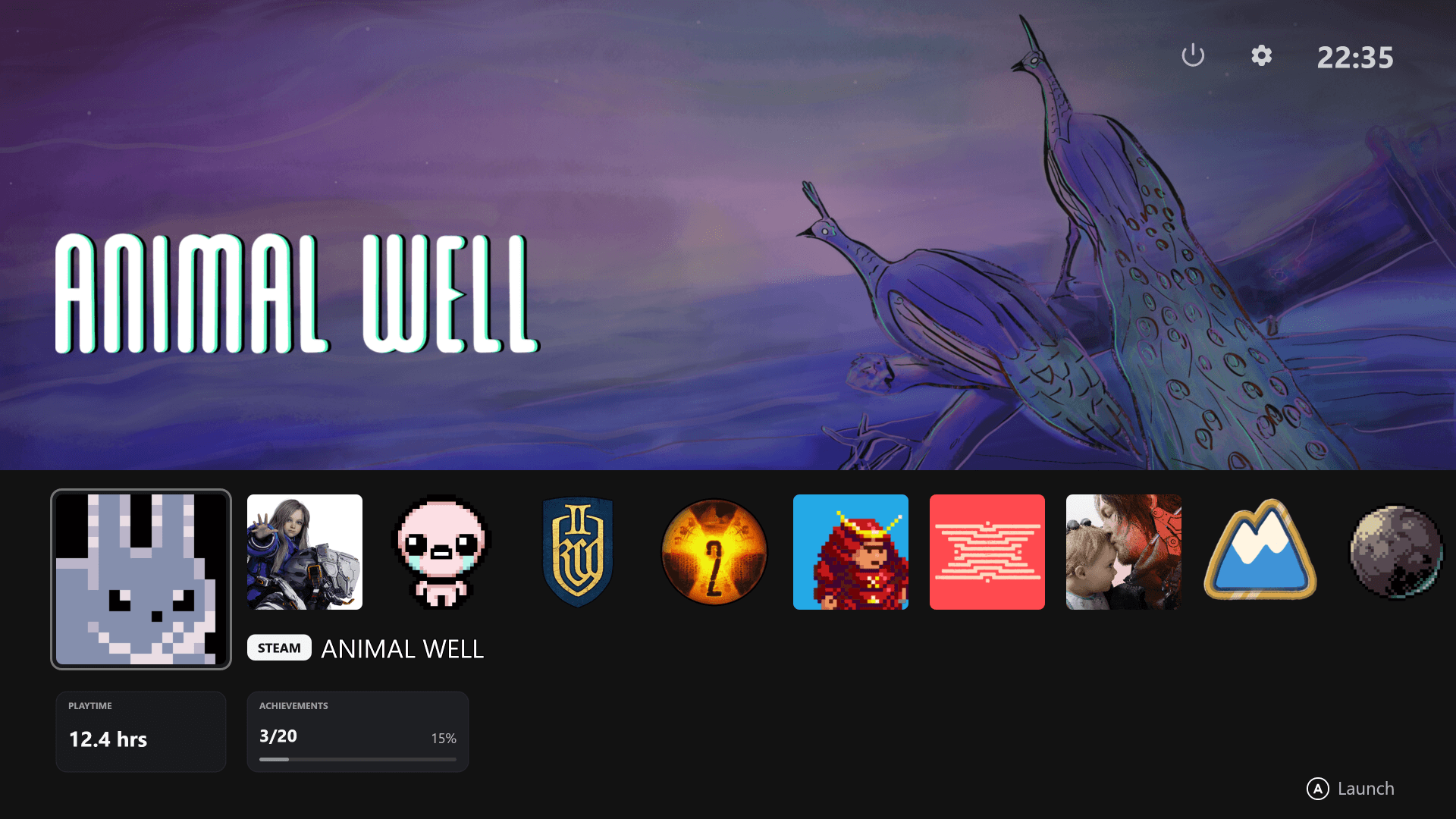
Bring multiple platform installs together into one horizontal, big-screen entry point.
The visual hierarchy is designed for long-distance readability and instant focus recognition, with card-based information blocks that stay clear on a TV.
Install detection + achievements
Beyond detecting installed games, Steam achievement lists, completion progress, and hidden achievements all become part of the same browsing flow.
Installed games
Achievement list
Completion progress
Installed games enter automatically
No separate maintenance list. Once an Epic title is installed, it appears in the same browse-and-launch surface, reducing platform switching.
Installed detection
Unified launcher
Big-screen navigation
Keep a console atmosphere on Windows
Local Xbox games are detected too, and combined with Home-button return they complete the console-like feel on Windows.
Installed detection
Home button return
Console-like flow
Showcase
The interface does not just fill the screen. It tells you where the focus is and what the next action should be.
The screenshots show focused cards, bottom action prompts, layered info panels, and an achievement list layout, all built around controller navigation rhythm.
Understand key info at a glance
Platform, storage size, tech tags, playtime, and achievement progress are split into quick-scan layers that work well from the couch with directional input.
Workflow
Turn boot, browse, launch, return, and wrap-up into one flow that never leaves the controller.
Big Screen Launcher behaves more like a TV home screen than a program that keeps sending you back to the desktop for edge cases.
01
Enter right after boot
Startup automation takes the device straight into the big-screen entry instead of leaving you on the desktop.
02
Browse with controller only
Xbox XInput and DualSense over USB act as first-class inputs, with focus and confirm feedback designed around controller logic.
03
Return from games seamlessly
Jump back to the launcher with the Xbox Home or PS button instead of hunting for the window after exit.
04
Finish without leaving the controller
Shutdown, sleep, and restart live inside the same UI, closing the loop for living-room use.
Microsoft Store
Big Screen Launcher is coming soon to Microsoft Store.
Big Screen Launcher is in the final stretch before release. When it is ready, it will be available there.